Connecting to the LAN
The device provides up to four Gigabit Ethernet (10/100/1000Base-T) ports for connection to the LAN (e.g., computers, switches, and IP phones). These ports support half- and full-duplex modes, auto-negotiation, and straight or crossover cable detection.
The RJ-45 connector pinouts are described in the following table:
RJ-45 Connector Pinouts for GbE
|
Pin |
Signal Name |
|---|---|
|
1 |
Ethernet signal pair (10/100/1000Base-T) |
|
2 |
|
|
3 |
Ethernet signal pair (10/100/1000Base-T) |
|
6 |
|
|
4 |
Ethernet signal pair (1000Base-T) |
|
5 |
|
|
7 |
Ethernet signal pair (1000Base-T) |
|
8 |
|
|
Shield |
Chassis ground |
| ➢ | To connect the device to the LAN: |
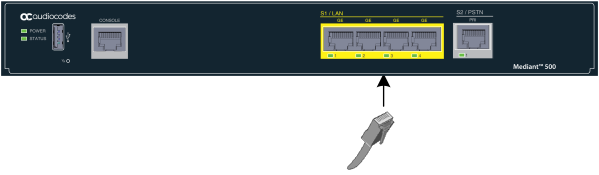
| 1. | Connect one end of a straight-through RJ-45 Cat 5e or Cat 6 cable to the RJ-45 port labeled S1 / LAN GE. |
Cabling the LAN Ports
| 2. | Connect the other end of the cable to the Gigabit Ethernet network. |